web
You’re offline. This is a read only version of the page.
close
Skip to main content

Notifications

Announcements

No record found.

Community site session details

Community site session details

Session Id :
Finance | Project Operations, Human Resources, ...
Suggested Answer

1099 2021 Print Alignment Release 10.0.23

(0) ShareShare
ReportReport
Posted on by 97

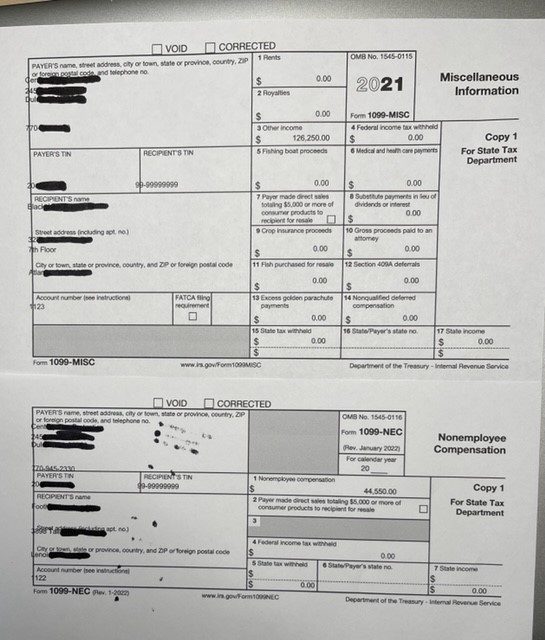
We just deployed release 10.0.23 to our test environment to resolve print alignment issues for our 1099s.  We only issue MISC and NEC types.  This release includes changes for the 2021 1099s.  While the alignment is very, very close, the left justified values are need to move 1 to 2 characters to the right.  

It looks like a similar topic is opened each year at the 1099 deadline. I thought I'd get the stream started early.

There a lot of variables in play:

1.  I'm printing the form from the PDF off of the government website.  When printing this it is important to select "Actual Size" rather than "Fit".  This makes a noticeable difference in the printed document and thus the alignment of the 1099 data.

2.  I am also printing the 1099 from d365 to a PDF.  I then print to the form in step 1 using the same printing rules.

3.  I am currently printing to a inkjet printer from my home.  The 1099s will ultimately be printed on a Xerox printer in the office.  This is a variable, but I don't think this shouldn't matter.

I'd really like to avoid customizing the report when it is so close.  I'm hoping someone might have a trick up their sleeve.  
1099-Alignment.jpg

I have the same question (0)
  • Ding Li Profile Picture
    480 on at

    Hi Mark,

    not sure I am following you.

    Have you checked this fix? Details for issue 646382 (dynamics.com)

  • Mark Schurmann2 Profile Picture
    97 on at

    The screenshot should show the problem.  The first character of the left most fields is outside of the boxes.  The description of this fix does not quite describe what we are seeing.  Plus we've applied the quality update to the 10.0.23 release, so if this was a hotfix available for 10.0.23, it would already be deployed to our test environment.  The item appears to be for 10.0.25.  If that is when it will be available, it won't do anyone any good because the 10.0.25 release will not be GA until mid February.  1099 deadline is 1/31/2022.

  • Ding Li Profile Picture
    480 on at

    The fix mentioned above has been published with build 10.0.1037.111 for 10.0.23. Please have a try

  • Suggested answer
    Mark Schurmann2 Profile Picture
    97 on at

    Our partner determined that there was a customization to the 1099 report from the prior year that was preventing the execution of the 1099 changes made in the 10.0.23 release.  After the customizations were removed the 1099 NEC and 1099 MISC printed perfectly.

  • Ding Li Profile Picture
    480 on at

    thanks for your update

  • Mark Schurmann2 Profile Picture
    97 on at

    To assist the rest of the D365 community with the 1099 printing, I thought I would provide some info on the successful completion of the 1099 alignment issue.

    After applying the 10.0.23 release and removing the customization that was causing trouble (see previous post), we attempted to print the 2021 1099s for MISC and NEC forms to pre-printed stock purchase at the local office supply.  The initial print alignment was awful.  We then figured out that the pre-printed stock had a 1/2 inch tear off on the right side.  We removed the tear off prior to loading the stock in the printer and both the MISC and NEC 1099s printed perfectly.  

    I believe that the tear off is there simply to pad the form to 8 1/2 x 11 for printers that cannot adjust to the 8" width.  I imagine that this is pretty uncommon.  There may be other 1099 stock that does not have the tear off.  It would seem that the D365 alignment assumes a form width of 8".  We will look for 8" x 11" stock next year.

    One other note to tie this up in a bow.  We did not print directly to the printer from D365 using the Document Routing Agent.  Instead we printed the 1099s to a pdf file and then printed the PDF.  When doing this, it is important to set the print parameter to "Actual Size" rather than "Fit".  

    I hope other will find this post helpful.

Under review

Thank you for your reply! To ensure a great experience for everyone, your content is awaiting approval by our Community Managers. Please check back later.

Helpful resources

Quick Links

Responsible AI policies

As AI tools become more common, we’re introducing a Responsible AI Use…

Neeraj Kumar – Community Spotlight

We are honored to recognize Neeraj Kumar as our Community Spotlight honoree for…

Leaderboard > Finance | Project Operations, Human Resources, AX, GP, SL

#1
Martin Dráb Profile Picture

Martin Dráb 660 Most Valuable Professional

#2
André Arnaud de Calavon Profile Picture

André Arnaud de Cal... 549 Super User 2025 Season 2

#3
Sohaib Cheema Profile Picture

Sohaib Cheema 307 User Group Leader

Last 30 days Overall leaderboard

Product updates

Dynamics 365 release plans



