web
You’re offline. This is a read only version of the page.
close
Skip to main content

Announcements

No record found.

News and Announcements icon
Community site session details

Community site session details

Session Id :
Dynamics 365 general forum

Look Up Record Fields are in incongruous between users

(0) ShareShare
ReportReport
Posted on by

Hello all. I apologize for the simpleness of this question but I am VERY new to Dynamics 365. I work for an MSP and I'm trying to rectify an issue for a client.

They use Dynamics 365 with the Outlook plugin. When users choose "Set Regarding" one can search records against a type while another only has a search box:
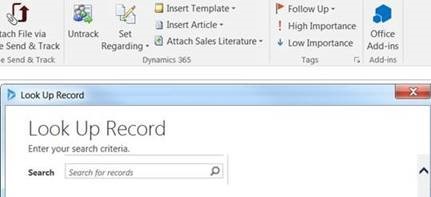
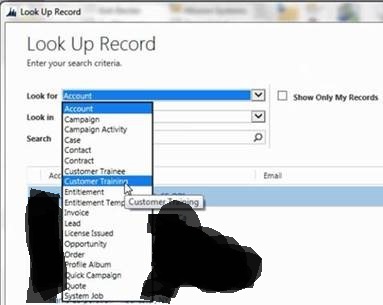
8551.just-search.jpg5344.look-for-in-search.jpg

I honestly don't even know where to begin to look. Any starting points would be greatly appreciated!

Categories:
I have the same question (0)
  • Suggested answer
    Alvaro Pino Profile Picture
    45 on at

    Hi Louis_K,

    Check if those users have same security role. Go to Settings>Security>Users open user record and in its associated view open the Security Roles.

    If they are not the same, this will be probably the issue.

    3021.security-roles.jpg

  • Community Member Profile Picture
    on at

    Thanks Alvaro! I was leaning in that direction and will try it out. I'll post my results when I test it out.

Under review

Thank you for your reply! To ensure a great experience for everyone, your content is awaiting approval by our Community Managers. Please check back later.

Helpful resources

Quick Links

November Spotlight Star - Khushbu Rajvi

Congratulations to a top community star!

Forum Structure Changes Coming on 11/8!

In our never-ending quest to help the Dynamics 365 Community members get answers faster …

Dynamics 365 Community Platform update – Oct 28

Welcome to the next edition of the Community Platform Update. This is a status …

Leaderboard > Dynamics 365 general

Last 30 days Overall leaderboard

Featured topics

Product updates

Dynamics 365 release plans
